The program provides the means for printing the items of interest as a pictured catalog. To select the items for printing, you should click on checkbox left of items. Once the list of items being printed is created, click on the Print button on the toolbar or select printing from the context menu.
Once you hit the Print button, the additional settings dialog will open. *. This dialog has 3 basic checkboxes for setting the print parameters:
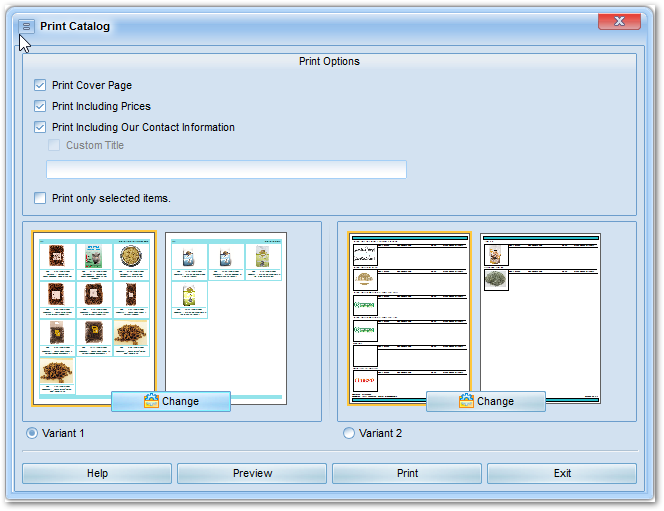
Print cover page. This page contains the name of your document and our complete contact information. This page prints out first.
Print including prices. When checked, the printouts will have the prices printed along with the item names and the reference numbers. If you uncheck this checkbox, the item prices will not appear on the printouts.
Print including our contact information*. When checked, the catalog’s header and footer will have our company name and our phone numbers. If you deactivate this option, you will be offered to enter your own title for each page of the catalog. In order to use this feature, you should check the “Custom title” checkbox and enter the title text in the textbox below. Otherwise, the title will not be printed at all.
Printing selected items only.
(
Description of Checkboxes in the Product List
here
)
When this option is selected, the catalog will be formed of the items
selected on the items list only. (To select items, tick-off the
checkbox at the left of the item of your interest). If the option is
not selected, the catalog will include all items from the current
group of items.
These features are provided to offer you the printed materials for your buyers and customers.
By default, the printout includes: cover page, prices and our contact information – what is recommended for the internal use of the document within your company.
* This feature is optional, and it depends on the creator of this Media whether the feature is available or not.