Formatting and setting currencies
You can format any column with numeric values as you like,
including indicate currency symbols.
All columns are personalized, and columns are edited individually for each section.
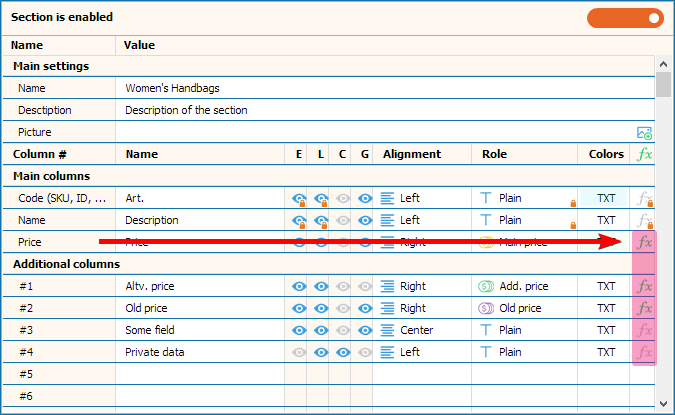
Click on the Sections button of the Product List tab to customize the columns.

Click on the green or gray integral icon opposite the settings of the desired column, a window for formatting and drawing up formulas for calculating data will open
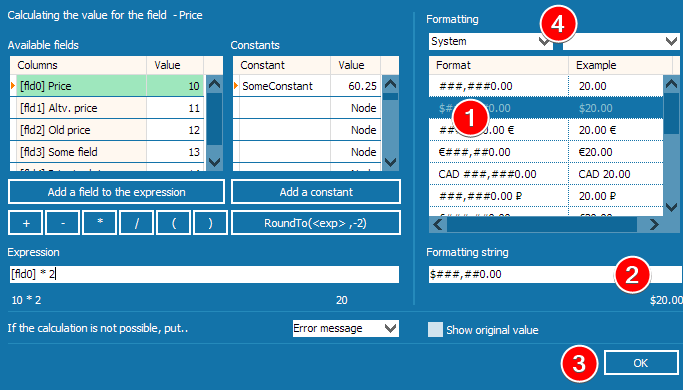
Select the appropriate preset currency format 1, if there is no suitable one,
in the "Format sting" 2 enter what you need on
analogy with other options from the list (ex: ###,##0.00 ₼ -> 100.00 ₼).
Click on the OK 3 button to save the result.
You can also choose the separator of the fractional part and the thousand 4,
if the system ones do not suit you.
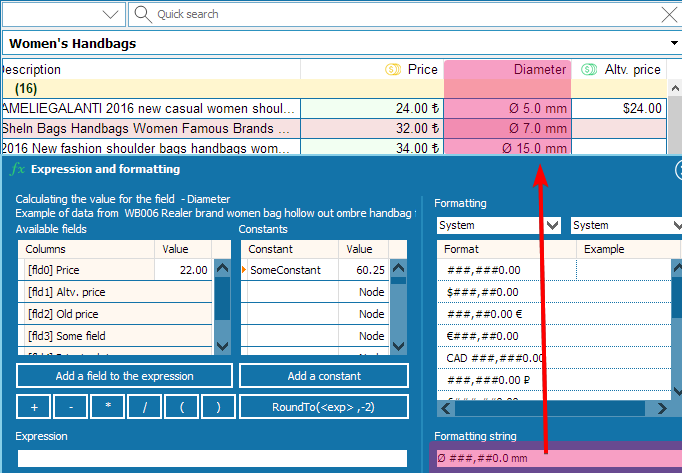
It does not have to be currency, it can be, for example Ø diameter.
The above issues of formatting and formulas for calculations are discussed in detail in this video (6:41)