DOWNLOAD
To take a closer look at our software for creating product catalogs on CD, download and install the free demonstration copy of MyBusinessCatalog Gold. Click on the 'Download' link and then select the necessary installation file on the page that appears. Try it now free of charge and see how it can help your business.
PURCHASE
The unregistered version allows evaluating all of the software’s features; however, it has a number of restrictions.
Registering MyBusinessCatalog will remove the restrictions and turn your copy of the software into a robust tool for the real business!

Tip of the day
Did you know...

You can easily import your data with Import Wizard
Learn more

Content


FAQ

Developer

Enduser


Creating Your Own Online Store . Setting Up Images.

The window has three tabs .

The first one is for setting up image sizes.
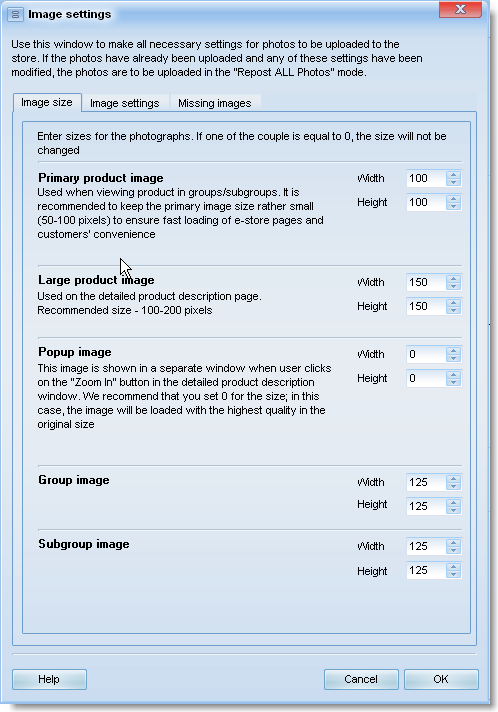


Before uploading, the program will automatically resize images for showing in different formats in the online store.

Image Settings
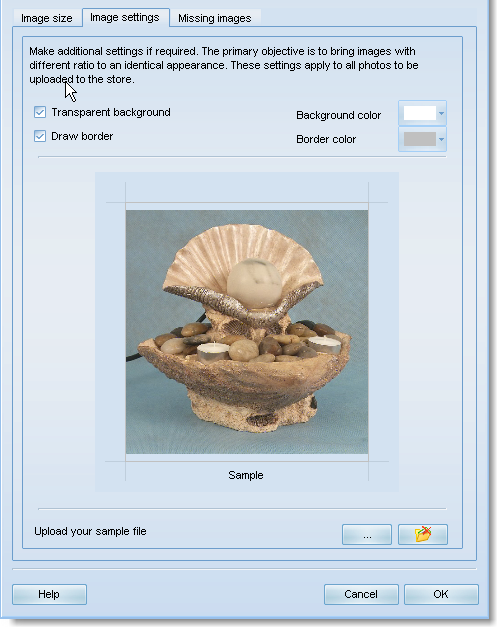

Adjust these settings to make the images with different side ratios look seamlessly near each other.

Missing Images
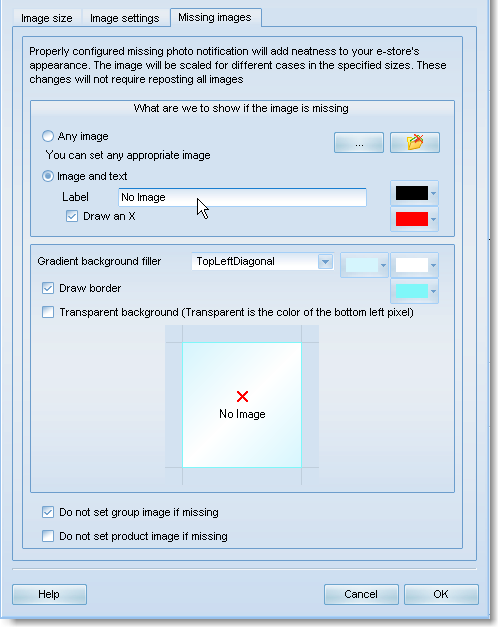


The vast majority of product catalogs have missing images.
Those may be caused by different reasons - unavailability of the images, time for processing them or the products in stock.
To include products with no images in the store and yet maintain the good appearance of the store, configure displaying alternative images instead of those that are missing.