DOWNLOAD
To take a closer look at our software for creating product catalogs on CD, download and install the free demonstration copy of MyBusinessCatalog Gold. Click on the 'Download' link and then select the necessary installation file on the page that appears. Try it now free of charge and see how it can help your business.
PURCHASE
The unregistered version allows evaluating all of the software’s features; however, it has a number of restrictions.
Registering MyBusinessCatalog will remove the restrictions and turn your copy of the software into a robust tool for the real business!

Tip of the day
Did you know...

You can create your own welcome page, which appears before anything else when the catalog is opened. Here you can provide details on your company, discount policy, address, driving directions, etc.
Learn more

Content


FAQ

Developer

Enduser


Tab names

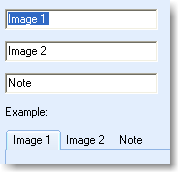
You can rename tabs that appear along with information on an item – to fit certain product theme or requirements. By default, the tabs are named as follows: Image1 – for the first image, Image2 – for the second one, and Notes – for detailed description.
To change the tab names, enter new names in the “Options – Tab names” dialog. The lower part of the dialog will display the result. Simultaneously, the changes are reflected in the main window.