We recommend FileZilla, a free multilanguage FTP client
You can get the latest version of it at
http://sourceforge.net/projects/filezilla/
Unzip the downloaded archive to any folder on your computer and run the file filezilla.exe
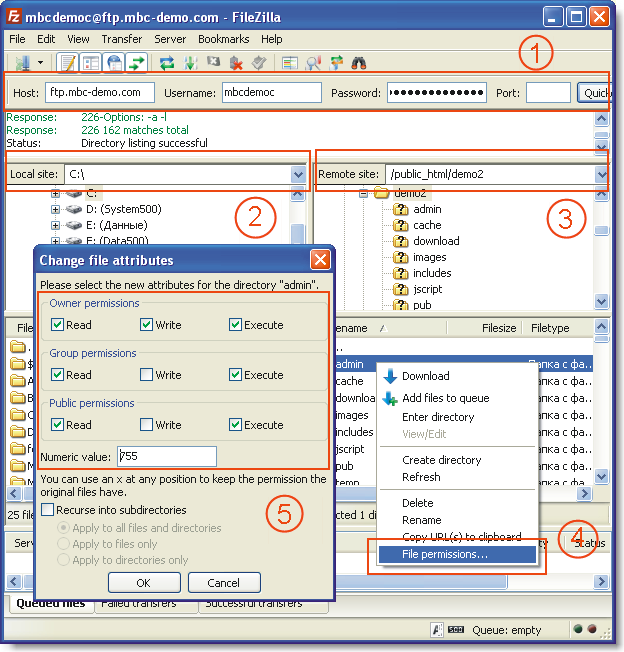
On the left side 2 select the file/folder that you are going to upload (the local file), on the right side 3 - the folder on the server, where you are going to upload the selected files/folders.
Then just drag and drop the files from the left panel to the right one.
Select the desired permissions 5 according to the recommendations outlined in the documentation.
You can get the latest version of it at
http://sourceforge.net/projects/filezilla/
Unzip the downloaded archive to any folder on your computer and run the file filezilla.exe
Uploading files
To connect to your server, type your account details in the 1 field and then click on the 'Quick Connect' button. (If you do not have that data, look for it in the message you should have received from your hosting company when setting up a hosting account (hosting is a place on the Net, where your web site is physically located), ask the administrator or create a new ftp-account in the hosting control panel.)On the left side 2 select the file/folder that you are going to upload (the local file), on the right side 3 - the folder on the server, where you are going to upload the selected files/folders.
Then just drag and drop the files from the left panel to the right one.
Setting file permissions (attributes)
Right-click on the file or folder to be edited and then select 'File Permissions' 4 on the menu.Select the desired permissions 5 according to the recommendations outlined in the documentation.